Why Crawl Budget Still Matters for Large Websites (and When It Doesn’t)
Crawl budget affects how well search engines can find and index your website's pages. Search engines allocate a specific number of pages they'll scan on your site within a given timeframe. Small website owners don't need to worry much about this. Larger sites with thousands or millions of pages need to make crawl budget a key SEO priority.
Search engines use crawl budget to determine how many pages they'll scan on your website during a set period. Website owners managing more than 10,000 pages need to understand the factors that shape their site's crawl budget. Your pages might not get indexed if they exceed your allocated crawl budget. This becomes a bigger challenge if you need new content indexed quickly.
Let me show you how Google decides to allocate crawl resources and what makes your crawl budget tick. You'll learn how your site's size and server performance shape your crawl budget. We'll look at situations where crawl budget becomes an SEO bottleneck. The piece will wrap up with practical steps to optimize your crawl budget and help search engines focus on your most valuable pages.
How to Know If Crawl Budget Is a Problem
You need to look at specific symptoms to figure out if crawl budget affects your site. Most websites with fewer than 10,000 pages don't worry about crawl budget. In spite of that, larger sites face challenges that require careful attention to how search engines use their crawling resources.
Signs of crawl budget issues in large sites
Your site's performance patterns reveal potential crawl budget problems. These warning signs show that your site might have crawl efficiency problems:
- New pages take weeks to show up in search results
- The Crawl Stats report in Google Search Console shows troubling patterns
- Server errors (5XX) happen too often during crawling
- Low-value or unimportant pages get crawled too much
- Crawl requests show unusual spikes and patterns
Google Search Console's Crawl Stats section reveals problems through high numbers of 4XX/5XX errors. Pages with non-HTML 200 status codes dominate the discovery. Server logs tell the real story about what gets crawled.
Your crawl capacity suffers when Googlebot hits too many fails with robots.txt, DNS resolution, or server connections. This means your site gets crawled less often, and important pages take longer to appear in search results.
High number of unindexed pages
Search engines see too many non-indexed pages as a red flag about your site's quality and structure. Your website's authority weakens, making it harder to compete for top keywords.
A big gap between known pages and indexed pages in Search Console points to crawl bloat. Yes, it is possible that Google wasted resources crawling these less important pages instead of the ones that matter.
Check these elements to spot high numbers of non-indexable pages:
- Redirects (3XX status codes)
- Missing pages (4XX errors)
- Server errors (5XX)
- Pages with robots noindex directives or canonical URLs
Google wastes your crawl budget when it visits pages that don't get indexed. Think of crawl budget as money - you need to spend it wisely.
Slow indexing of new or updated content
Search engines should find your new pages and updates quickly. Slow indexing creates problems for:
- Product launches that miss their window
- Seasonal content that's late
- Content updates that lag behind competitors
- Time-sensitive campaigns that miss their chance
Your site might have crawl budget issues if new content takes weeks to appear in search results. Google tries to check and index most pages within three days, unless you run a news site or have urgent content.
Server logs show when Googlebot last visited specific URLs. The URL Inspection tool in Google Search Console helps track indexing dates for updated content.
Large companies waste millions of crawls each month due to crawl inefficiency. Catching these warning signs early helps you fix problems before they hurt your site's performance.
Technical Factors That Drain Crawl Budget
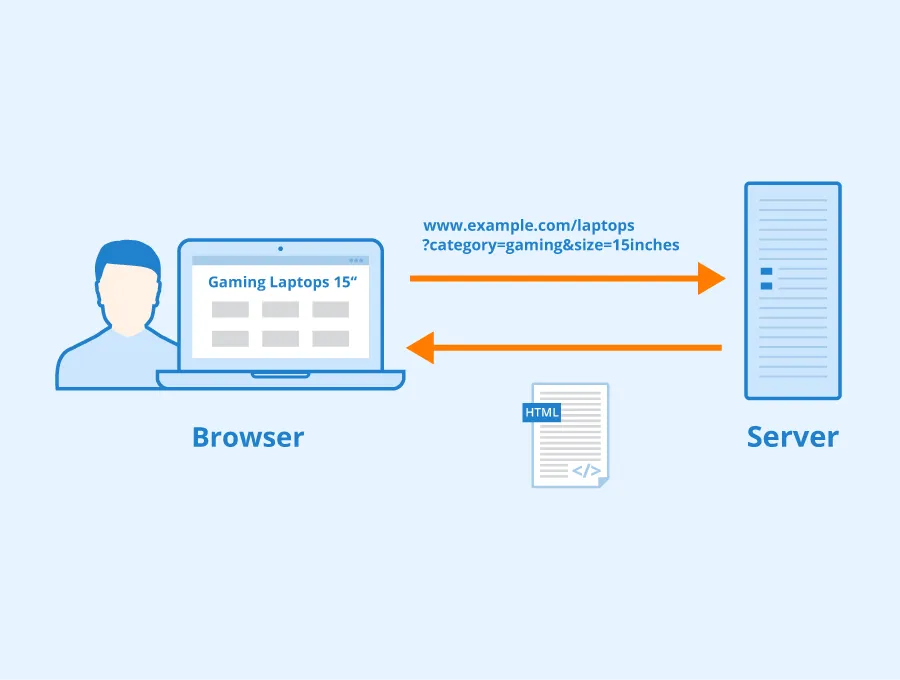
Technical issues can hurt your crawl budget efficiency. Search engines waste resources on less valuable pages while important content stays hidden from view.
Excessive URL parameters and session IDs
URL parameters and session IDs create one of the most common crawl budget problems, especially when you have e-commerce sites. These simple additions to URLs can create endless combinations of pages for search engines to crawl. Product filters, tracking codes, and session identifiers create variations that Googlebot sees as separate pages.
To cite an instance, see how a standard product page collects multiple filter parameters:
https://www.example.com/toys/cars?color=black&size=large&sort=price
Each parameter combination creates a new URL for Google to crawl, though the content stays mostly the same. This faceted navigation leads to duplicate content problems and makes Googlebot waste resources on redundant pages. Even when Google spots these variations, crawling them still uses up your budget.
Session IDs through URLs cause similar problems. These identifiers create multiple copies of similar pages, which makes Google notice your site as low-quality or spammy. This view affects the crawl budget given to your site because Google wants to save resources on websites it finds less valuable.
JavaScript-heavy pages and rendering delays
JavaScript-heavy websites, like Single Page Applications (SPAs), face unique crawl budget challenges in the rendering process. Googlebot first crawls the HTML, then puts JavaScript-heavy pages in a queue for rendering - a process that needs much more resources.
The rendering queue creates big delays between crawling and rendering. Research shows the median rendering delay is 10 seconds. This delay jumps to 3 hours at the 90th percentile and reaches 18 hours at the 99th percentile. These delays affect how fast Google finds links in JavaScript-rendered content.
Google needs 9 times more time to crawl JavaScript pages than plain HTML. Erik Hendriks from Google points out that "crawl volume is gonna go up by 20 times when I start rendering". This huge increase happens because:
- Links added through JavaScript need rendering before discovery
- JavaScript execution time affects core web vitals scores
- Extra resources needed for rendering count against your crawl budget
Large sites often find new content gets discovered and indexed slowly. Server-side or hybrid rendering works better for SEO-critical pages.
Overuse of redirects and broken links
Redirect chains and broken links waste crawl budget usage heavily. Each redirect or broken link wastes time and resources as Googlebot tries to reach the final destination.
Long redirect chains cause the biggest problems as each hop adds delay. Google follows up to five chained redirects in one crawl, but every step uses crawl resources. The worst case shows infinite redirect loops - Page A points to Page B, which points to Page C, which points back to Page A. Googlebot gives up crawling when it finds such loops, and large parts of your site might stay hidden.
Too many 404 errors make search engines waste time on dead-end pages. One source notes that "Search engine bots may repeatedly attempt to crawl non-existent pages, consuming valuable crawl resources that could have been used for indexing important content". Large websites face compound problems - possibly millions of wasted crawls each month.
You can optimize your site's crawl efficiency by fixing these three technical factors. This helps search engines focus on your most valuable content.
Tactical Fixes to Improve Crawl Efficiency
Search engines will interact better with your site once you fix crawl budget problems and put solutions in place. These optimization techniques help direct crawlers to your most valuable content first. Your important pages get priority attention even with a limited crawl budget.
Flattening site architecture to find content easier
A well-laid-out site architecture makes search engines find and crawl your content quickly. We focused on keeping the site's structure as flat as possible. The goal is to limit clicks to reach any critical page to no more than two clicks from the homepage. This "click depth" concept is vital since pages closer to your homepage get more link equity and better crawling priority.
The results of a flattened architecture are impressive. Your homepage can link to 100 pages, and each of those pages can link to another 100 pages. This means visitors and search engines can reach 1,000,000 different pages within just three clicks. The "3-Click Rule" will give a clear path to important pages in your site structure.
Start by identifying your most important pages. Then restructure your internal linking to create shorter paths to these pages. You can reorganize your navigation menu, add strategic internal links, and create hub pages for broad categories. This works better than cluttering the homepage with countless links and helps guide crawlers toward high-value content.
Removing low-value or duplicate pages
Content pruning optimizes crawl budget by removing low-quality pages. Each page on your site uses part of your crawl budget. Pages that don't add value to users or search engines should go.
Here's what you need to think about for content pruning:
- Remove or update pages with outdated information that no longer helps
- Get rid of duplicate content that confuses crawlers and wastes resources
- Merge similar content about the same topic into one stronger page, then 301 redirect weaker pages to the better URL
- Handle pages without traffic or rankings by redirecting them to equivalent content or using a 410 Gone HTTP status code
Removing these problematic pages frees up bandwidth for search engines to crawl other areas of your site. Pages with high crawl depth get indexed faster when you manage your overall URL inventory well.
Using canonical URLs and noindex tags
Canonical tags, noindex directives, and robots.txt are powerful tools that guide crawlers to your most important pages. Each one serves a different purpose.
Canonical tags help search engines understand content relationships and identify preferred URL versions. E-commerce platforms find these especially valuable because products might create multiple URLs with similar core content. These tags unite signals from multiple versions of a page into a single canonical URL.
"Noindex, nofollow" tags won't stop search engines from crawling your pages but will slow them down. Google uses these tags to deprioritize crawling certain pages. Search engines may crawl noindexed pages less often over time, which saves crawl budget for more important content.
The best way to implement these:
- Use canonical tags strategically but don't rely on them too much, note that crawlers will crawl two pages for every canonicalized page
- Put noindex tags on thin content pages with minimal value, login or temporary pages, and some types of duplicate content
- Use robots.txt to block crawling of unimportant sections like admin folders, infinite scrolling pages, or staging environments
These tactical fixes will improve your crawl efficiency noticeably. Search engines can focus their resources on your most valuable pages instead of wasting time on low-value content.
Tools to Monitor and Optimize Crawl Budget
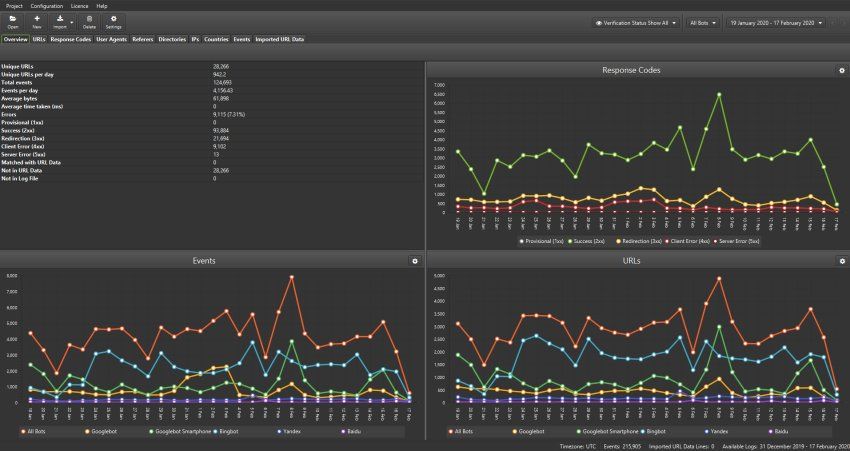
You need specialized tools to learn about how search engines interact with your website and monitor crawl budget. These tools help you find ways to optimize and measure the effects of technical SEO changes.
Google Search Console Crawl Stats
The Crawl Stats report in Google Search Console shows you exactly how Googlebot crawls your site. You'll find this report in the Settings section. It shows total crawl requests, download size, and average response time in the last 90 days.
The report shows crawl requests by:
- Response codes (200 OK, 301 redirects, 404 errors)
- File types crawled (HTML, CSS, JavaScript)
- Crawl purpose (discovery vs. refresh)
- Googlebot type (smartphone, desktop, image)
This report helps you spot host status problems. Your crawl capacity suffers if Googlebot sees too many failures with robots.txt fetches, DNS resolution, or server connectivity. Google will crawl fewer pages as a result, which reduces your site's visibility.
Look for these red flags in the report:
- Unusual spikes in crawl activity that suggest inefficient crawling
- Too many 4XX or 5XX errors eating up crawl resources
- More crawls of CSS and JavaScript files than HTML content
- Uneven split between discovery and refresh crawl purposes
Large websites should save this data often since GSC only keeps the last 90 days of data.
Screaming Frog SEO Log File Analyser
Server log analysis tells you the real story about crawling patterns, even though GSC shows useful trends. Tools like Screaming Frog Log File Analyzer let you check server logs to see which URLs search bots actually crawl.
Log file analysis shows you the pages that get crawler attention and those that don't. You can see:
- URLs with most and least crawls
- Site sections getting too much attention
- Patterns in crawl frequency
- Each page's average response time
Log analysis matches crawl data with your site structure. This helps you find orphan pages - URLs that appear in logs but aren't linked on your site. You'll spot hidden crawl problems that GSC misses.
Technical teams use log files to check if SEO changes work. The logs show whether crawl patterns change after adding canonicalization or noindex tags.
Prerender.io for JavaScript-heavy sites
JavaScript-heavy sites face special crawl budget challenges. Rendering JavaScript needs about 9 times more resources than standard HTML. This can quickly use up your crawl budget, leaving many pages undiscovered.
Prerender.io solves this by creating static HTML versions of JavaScript pages for search engines. Search engines get a cached, pre-rendered version that loads right away when they visit your site.
The tool offers these benefits:
- JavaScript content loads faster
- Site crawling becomes more efficient
- Dynamic content gets indexed better
- Your site stays safe from traffic drops caused by poor JavaScript rendering
Sites with over 10,000 pages that update often need Prerender to save crawl budget. The service works with Googlebot, GPTBot, and other AI crawlers, making it ready for future search technologies.
Keep checking server logs after setting up Prerender to make sure it works. Log analysis proves whether crawl frequency improves and spots any JavaScript rendering issues.
These three tools, Google Search Console, log file analysis, and pre-rendering solutions create a complete system to monitor and optimize your site's crawl budget. This ensures search engines focus on your most important content.
When Crawl Budget Doesn’t Matter Much
You don't need to obsess over crawl budget optimization for every website. Google typically allocates enough resources to crawl certain types of sites completely without any special effort.
Small websites with fewer than 1,000 pages
We noticed that websites with fewer than 1,000 pages rarely hit crawl budget limits. Google's Gary Illyes backed this up, saying that "crawl budget is not something most publishers should worry about" unless they have "more than a few thousand URLs." Google can crawl these smaller sites completely in one session. Crawl budget optimization becomes unnecessary. These sites stay well below the problem threshold even with regular updates.
Static content sites with low update frequency
Crawl budget concerns are even less important for sites that rarely change their content. Google adjusts its crawl frequency after finding that a website updates infrequently. This works out perfectly - Google saves resources by visiting less often, which matches what the site needs. Blogs with monthly posts or reference sites that update quarterly still maintain excellent indexing despite fewer crawler visits.
Sites with strong internal linking and fast servers
Websites with solid technical foundations can avoid crawl budget issues whatever their size. Two things stand out here:
- Response time - Google gives more generous crawl allocations to sites that consistently respond in under 100ms because it sees them as high-quality properties
- Internal link structure - Crawlers naturally find priority content first on websites with logical, flat architectures where important pages are just 3-4 clicks from the homepage
Larger sites can effectively skip crawl budget limitations in these cases because search engines find and index critical content efficiently without wasting resources. Server performance makes the difference - John Mueller of Google pointed out that "slow sites are a waste of Googlebot's time," which explains why faster sites get better crawling treatment.
How to Future-Proof Crawl Budget Allocation
Search engines need smart strategies to crawl your site efficiently. Your site preparation should look ahead to how these engines will use their resources.
Segmenting sitemaps by content type
Smart sitemap structure helps search engines use their crawl resources better. Google limits each sitemap to 50,000 URLs or 50MB, so large websites need sitemap index files that point to multiple specialized sitemaps. Your sitemaps should be split based on content type and how often they update:
- Primary/static pages (rarely changed content)
- High-frequency content (blog posts, news articles)
- Media assets (images, videos)
- Product categories or sections
This setup lets search engines find relevant areas quickly and prioritize fresh content. To name just one example, see how comparing XML sitemaps can reveal problems - if section A shows 480 of 500 pages indexed while section B only has 120 of 500, you know exactly where to focus.
Using HTTP/2 and server push
HTTP/2 makes crawling faster through multiplexing, which combines multiple file requests into one connection. Search engine crawlers can process your site more efficiently with reduced latency.
Server Push makes this even better by sending critical resources before they're requested. Fastly's system shows how browsers cache pushed resources as separate HTTP objects with proper Cache-Control headers. These technologies give crawlers quick access to key page elements, which speeds up content indexing.
Automating sitemap updates and error checks
Website changes happen constantly, making manual sitemap updates impractical. Automated generation keeps your sitemaps current. The <lastmod> tag tells search engines when indexed URLs change.
Automated checks find problems like broken links, redirects, or pages that crawlers can't reach. WordPress plugins can update sitemaps automatically when content changes. Beyond keeping things accurate, automation finds orphan pages and spots indexing problems in different sections.
These forward-looking strategies will keep your crawl budget working well as your site grows and changes.
Conclusion
Crawl budget optimization is crucial for websites with more than 10,000 pages. This piece explains how search engines use their limited crawling resources and why managing this budget affects your site's visibility. Large websites face challenges that smaller sites never encounter.
Several factors help Google decide crawl allocation. These include your site's response time, overall architecture, and authority. Sites that respond in under 100ms usually get more generous crawl allocations. A logical, flat architecture naturally guides crawlers to priority content first. This makes each crawl session more effective.
Technical problems can drain your crawl budget quickly. Search engines waste valuable resources on less important content because of URL parameters, JavaScript-heavy pages, and redirect chains. Large enterprises might waste millions of crawls monthly as these problems grow.
You'll spot the warning signs easily once you know what to look for. Pages might take weeks instead of days to show up in search results. High numbers of server errors during crawling and too much crawling of low-value pages point to crawl budget problems. Search Console's Crawl Stats report is a great way to get insights. Server log analysis shows exactly what's being crawled.
Websites with fewer than 1,000 pages don't need to worry about crawl budget limits. Google gives enough resources to crawl these sites completely without special help. Static content sites that rarely update face fewer issues since they need less frequent crawling.
Tactical improvements work well for larger sites. You can help direct crawlers to your most valuable content by flattening site architecture, removing low-value pages, and using canonical tags strategically. It also helps to future-proof your site. You can do this by splitting sitemaps by content type and using HTTP/2 as your site grows.
It's worth mentioning that crawl budget optimization has one main purpose: making sure search engines find and index your key pages efficiently. This technical process affects whether people see your content in search results at crucial moments. Even the best content is useless if search engines can't find it.
Key Takeaways
Understanding crawl budget becomes crucial for large websites to ensure search engines efficiently discover and index your most valuable content.
• Crawl budget only matters for sites with 10,000+ pages - smaller websites rarely face crawl limitations as Google allocates sufficient resources to crawl them completely.
• Technical issues like URL parameters, JavaScript rendering, and redirect chains waste crawl resources - these problems compound quickly on large sites, potentially wasting millions of crawls monthly.
• Monitor crawl efficiency through Google Search Console's Crawl Stats and server log analysis - look for slow indexing, high error rates, and excessive crawling of low-value pages as warning signs.
• Optimize crawl budget by flattening site architecture, removing duplicate content, and using canonical tags strategically - keep important pages within 3 clicks of homepage and eliminate low-value URLs.
• Future-proof your crawl allocation by segmenting sitemaps by content type and implementing HTTP/2 - this helps search engines prioritize fresh content and process your site more efficiently.
The bottom line: crawl budget optimization ensures your most important pages get discovered first, directly impacting whether your content appears in search results when it matters most.